Category: Best Job Board Software

Job Board Software

  • Jobseeker Features

    The candidate journey

    Four stages, one smooth experience

    Every job-seeker feature maps to a moment in the journey from first search to first day.

    01

    Find

    Advanced search by location, category, keyword, experience, and ZIP.

    02

    Build

    A step-by-step resume builder with multiple and video resumes.

    03

    Apply & track

    One-click apply, a personal dashboard, and daily job alerts.

    04

    Interview

    Online interviews, assessments, and tests — start to offer.

    Find

    Powerful job search

    • Search jobs by location, category & company
    • Advanced search with keywords and experience
    • Search by duration — one week, 30 days, and more
    • US ZIP code search
    • Filter search results to zero in fast

    Job search screen with location, category, and keyword filters

    Account

    Quick job seeker profile

    • Quick registration with email and password
    • New-account notification email with login details
    • Retrieve password by automated email
    • Update the profile at any time

    Job seeker profile registration and account settings

    Track

    A dashboard that keeps everything in one place

    • View jobs applied for and save jobs for later
    • See how often employers viewed your resume
    • Automated job-application responses
    • Add, edit, delete Job Search Agents
    • Daily job alerts matching your criteria, by email
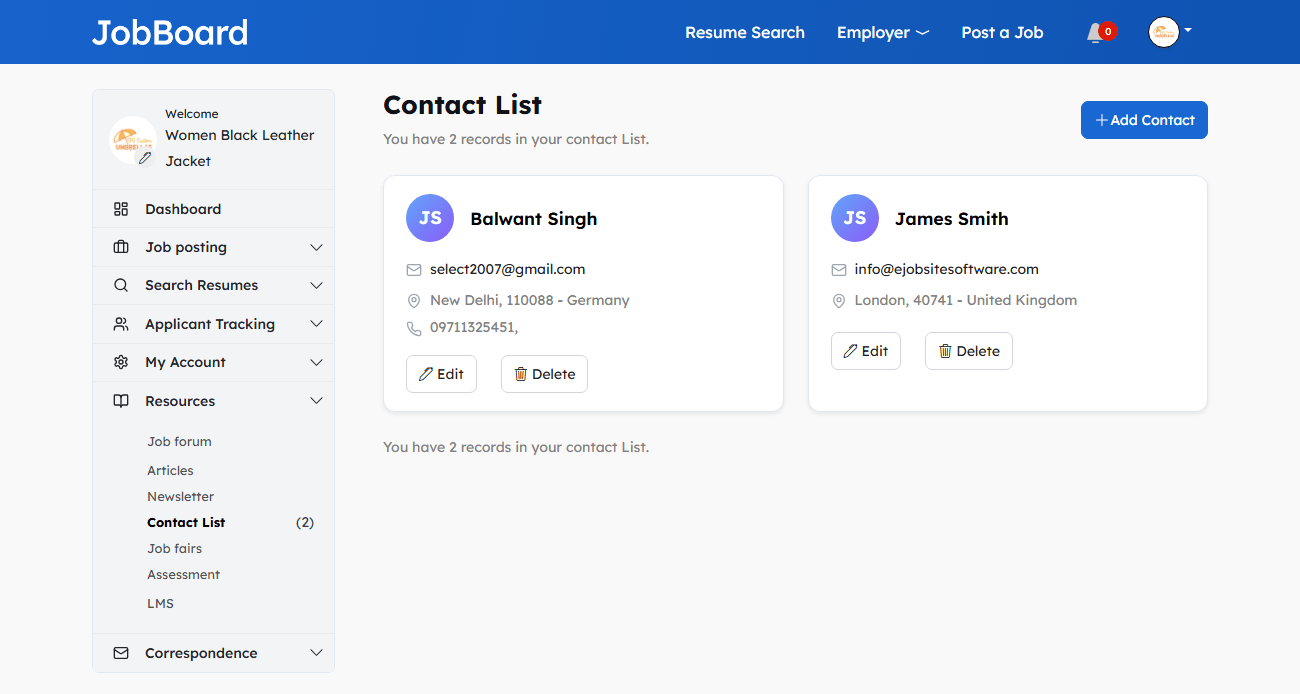
    • Interview emails from employers, plus a contact list

    Job seeker dashboard with applications, saved jobs, and alerts

    Build

    Complete resume management

    • Step-by-step resume-building wizard
    • Submit a resume to any employer with one click
    • Multiple resumes — public, private, or confidential
    • Cut-and-paste or upload PDF/DOC; add a video resume via YouTube
    • Hide contact info; make resumes searchable or not
    • View resume statistics, created and updated dates

    Resume builder wizard with multiple resume options

    Apply

    Smart job management

    • View job detail and apply in a click
    • View the company’s response to your application
    • Share a job, email it to a friend, or print it
    • View any company’s profile
    • See all jobs posted by a specific company

    Job detail and application management screen

    Interview

    Online interview & assessment

    • Online interviews and live video interviews
    • Pre-recorded video interviews
    • Online assessments and tests
    • A seamless path from application to offer
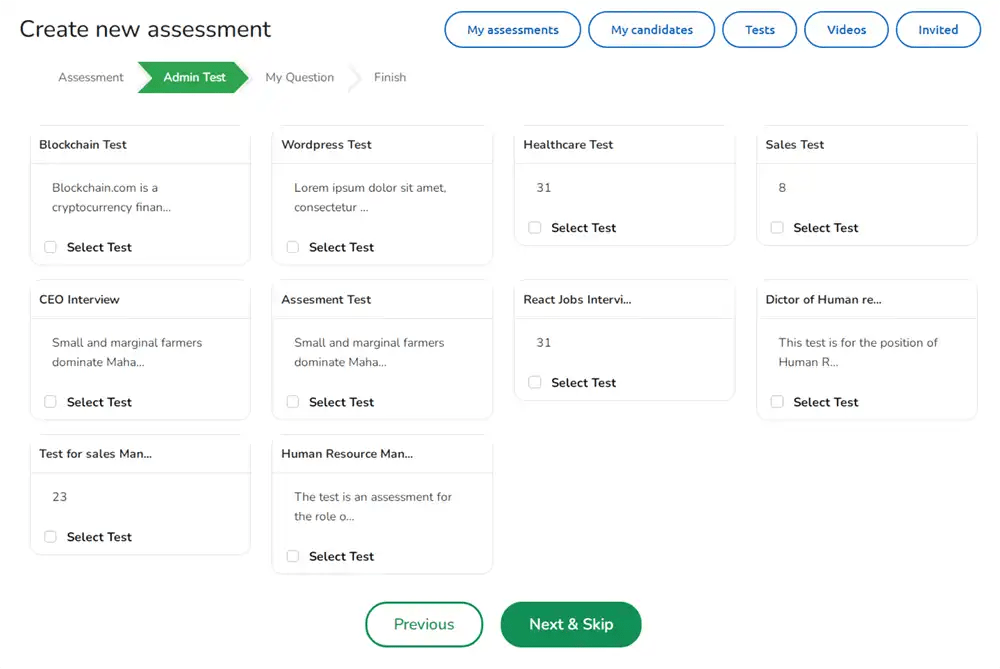
    Online interview and assessment software for job seekers

    Everything else

    More job seeker features at a glance

    The complete job-seeker toolkit, summarised.

    Job seeker features — eJobsite job board software
    Feature What it does
    Premium job seeker Featured placement so your resume appears prominently in employer resume search.
    Video resume Add a video resume via a YouTube link to stand out from text-only applicants.
    Job search agents Saved searches that email matching jobs automatically every day.
    Resume statistics See how often employers viewed your resume and when it was last updated.
    Resume visibility Set each resume public, private, or confidential, and hide contact details.
    Cover letter Attach a cover letter to strengthen applications.
    Newsletter Opt in or out of the mailing list at any time.
    Forum Join the community forum to connect and ask questions.
    Mobile-friendly Search, apply, and track from any device.

    Answers

    Frequently asked questions

    What job search features does the software offer job seekers?
    Job seekers can search by location, category, and company, use advanced search with keywords and experience, search by duration such as one week or 30 days, search by US ZIP code, and filter the results.
    Does it include a resume builder?
    Yes. A step-by-step wizard lets job seekers create resumes, add multiple resumes, set them public/private/confidential, upload a PDF or doc, add a video resume via YouTube, and view resume statistics.
    Can job seekers track their applications?
    Yes. The dashboard shows jobs applied for, saved jobs, how often employers viewed the resume, automated application responses, and interview emails from employers.
    How do job alerts work?
    Job seekers add a Job Search Agent with their criteria, and the system emails matching jobs daily. Agents can be added, edited, or deleted any time.
    Does it support video resumes and online interviews?
    Yes. Add a video resume via a YouTube link, and use online interviews, video interviews, pre-recorded interviews, online assessments, and tests.
    Is the job seeker experience mobile-friendly?
    Yes. The platform is mobile-friendly, so job seekers can search, apply, track applications, and receive alerts from any device.
    What other feature categories are available?
    Beyond job seeker features, there are separate feature sets for employers, admin, ATS, marketing, social, mobile, AI, messaging, and API — all linked at the top of this page.
    Are these features included in the price?
    Yes. Job seeker features are part of eJobsite job board software — a one-time payment from $600 with no monthly fees.

    See every feature in the live demo

    Explore the job seeker experience — search, resume builder, dashboard, and interviews — hands-on. Or talk to us about launching your own job board.

    One-time payment from $600 · All features included · info@ejobsitesoftware.com · +91 98103 36906
  • Administrator Features

    The control center

    Everything you control, grouped

    The admin menu spans 25+ modules. Here they are organized into six areas of control.

    People & access

    • Recruiters — add, edit, delete, feature, disable
    • Job seekers — manage paid & free, feature, disable
    • Search job seekers, employers & resumes
    • Administrators — members, groups & permissions
    • Print & account management

    Jobs & orders

    • Jobs — active, expired, deleted, imported, featured
    • Job stats — views, clicks, applications
    • Orders — pending, processing, completed
    • Import jobs (backfill from external feeds)
    • Rate cards & membership plans

    Reports & analytics

    • Dashboard with yearly & monthly reports
    • Totals for job seekers, recruiters & jobs
    • Sales reports & latest orders
    • Featured counts across all entities

    Design & content

    • Themes — 18 built-in, CSS-customizable
    • Article manager & categories
    • Forum management
    • Page & file manager (Tools)

    Marketing & money

    • SEO — meta tags, sitemap, analytics, Twitter
    • Banner management with ad stats
    • Newsletter manager
    • Rate cards & payment gateways

    System & settings

    • Settings — locations, categories, experience, etc.
    • Configuration, localization & email templates
    • Tools — backups, who’s online, IP blocking
    • Cron jobs, messages & social login plugins

    Command center

    The admin dashboard

    • Reports on total job seekers, recruiters, jobs & sales
    • Yearly & monthly reports, plus latest orders
    • Full control over global site configuration
    • Direct access to job seeker & employer control panels

    Job board admin dashboard with reports and site controls

    Design

    Theme management — 18 built in

    • Eighteen themes built into the software
    • Add, edit, or delete themes; the theme is your homepage
    • Fully customizable CSS-based design & layout
    • Edit the logo, theme configuration, CSS, or text

    Theme management with 18 built-in job board themes

    Monetize

    Rate cards & payment plans

    • Set up plans (Platinum, Gold) with variable fees & periods
    • Control job posts and CV searches per plan
    • Free demo plan plus featured-jobseeker pricing
    • Payment gateways — PayPal or manual bank transfer

    Rate card and employer pricing plan setup

    Get found

    Built-in SEO tools

    • Add meta tags — title, keywords, description
    • View search tags; generate & submit an XML sitemap
    • Add Google Analytics; view page rank
    • Twitter Submitter — auto-post jobs to Twitter

    SEO settings: meta tags, sitemap, and analytics

    Fill the board

    Import & backfill jobs

    • Backfill jobs from external feeds into the database
    • Imported jobs appear in search, posted under an employer ID
    • Filter by campaign, publisher, location, country & keyword
    • Sort by date or relevance; set active/inactive

    Import XML jobs to backfill the job board

    Operate

    Tools & site safety

    • Automatic database backup (.sql.zip) & restore
    • Page manager & file manager for site content
    • Who’s Online — track visitors and members live
    • Block the IP address of spammers

    Admin tools: database backup manager

    The complete list

    Every admin module

    The full admin menu and what each module controls.

    Admin panel modules — eJobsite job board software
    Module What you control
    Dashboard Site-wide reports, sales, yearly/monthly views, and global configuration.
    Recruiters Add, edit, delete, sort, feature, or disable employers; view their jobs and orders.
    Job Seekers Manage free and paid job seekers; feature, disable, and view profiles.
    Jobs All jobs (active, expired, deleted, imported); stats, featuring, and editing.
    Orders Order list by status, ID, amount, and date; edit or delete orders.
    Search Search job seekers, employers, and resumes; view and rate resumes.
    Reports Year- and month-wise totals for seekers, recruiters, and jobs.
    Themes 18 built-in themes; add/edit/delete, logo, CSS, and configuration.
    Setting Locations, job types, categories, languages, experience, education, resume weight, social login, captcha.
    Rate Card Membership plans, post/CV limits, demo plan, featured pricing, gateways.
    SEO Meta tags, search tags, XML sitemap, analytics, page rank, Twitter auto-post.
    Banner Management Upload banners/AdSense, schedule, place, and track AdViews, clicks, CTR.
    Tools Backups, restore, page/file manager, who’s online, IP blocking, email.
    Email Templates Ready-made templates for alerts, registrations, invoices; add/edit/delete.
    Import Jobs Backfill jobs from external feeds by campaign, location, keyword, and more.
    Newsletter Send to seekers/employers, rich text editor, history, lock for safety.
    Messages View responses from employers and reply.
    Configuration Site title, widths, email options, GZip, logging, module toggles.
    Administrator Admin members, groups, and file-level permissions.
    Localization Add/edit currencies and languages; set defaults.
    Article Manager Category-wise articles with media, meta tags, preview, and sorting.
    Forum Forums, categories, posts, replies, featuring, and configuration.
    Cron Scheduled jobs: RSS feeds, alerts, reports, backups, page rank.
    Print Print job seeker and employer lists with selected fields.

    Answers

    Frequently asked questions

    What can the job board admin panel do?
    It gives full control over the whole board: managing recruiters, job seekers, jobs, and orders; rate cards and plans; theme and content management; SEO; banners; newsletters; importing jobs; email templates; localization; cron jobs; backups; and global site configuration.
    How many themes are built into the software?
    Eighteen. The theme management system lets admins add, edit, or delete themes, edit the logo, change configuration, and customize the CSS-based design and layout. The theme is the homepage of the job board.
    Can admins monetize the job board?
    Yes. The Rate Card module sets up plans like Platinum or Gold with variable periods and fees, controls posts and CV searches per plan, supports a free demo plan and featured-jobseeker pricing, and adds gateways such as PayPal or manual bank transfer.
    Does the admin panel include SEO tools?
    Yes. Add meta tags (title, keywords, description), view search tags, generate and submit an XML sitemap to Google, add Google Analytics, view page rank, and auto-post jobs to Twitter.
    Can I import jobs from other sources?
    Yes. The Import Jobs module backfills jobs from external feeds into the database, posted under an employer ID, filtered by campaign, location, country, job type, keyword, and duration.
    Does it support multiple currencies and languages?
    Yes. The Localization module manages currencies and languages and sets defaults, while the Setting module controls dropdowns for countries, categories, experience, education, and more across the whole site.
    Can multiple administrators manage the site?
    Yes. Add, edit, or delete admin members, create new admins, set up member groups, and grant file-level permissions, so responsibilities can be divided across a team.
    Are these admin features included in the price?
    Yes. The full admin panel is part of eJobsite job board software — a one-time payment from $600 with no monthly fees.

    Run your whole job board from one panel

    Explore the admin dashboard, themes, rate cards, SEO, and tools hands-on in the live demo — or talk to us about launching your own job board.

    One-time payment from $600 · No technical team needed · info@ejobsitesoftware.com · +91 98103 36906
  • Employer Features

    The hiring journey

    Four stages, one recruiter workflow

    Every employer feature maps to a step in filling a role — from sourcing talent to making the hire.

    01

    Source

    Search the resume database and post or import jobs.

    02

    Manage

    Recruiter dashboard, sub-accounts, and job management.

    03

    Screen

    Custom screening questions and resume ratings.

    04

    Hire

    Track applicants, send interview requests, select.

    Source

    Search the resume database

    • Search resumes by category, rating, name, email, experience & keywords
    • Search by location — country, city, ZIP
    • Filter the results to find the right people fast
    • Search applicants who applied by first name, last name & email

    Search applicants who have applied for a job

    Post

    Complete job management

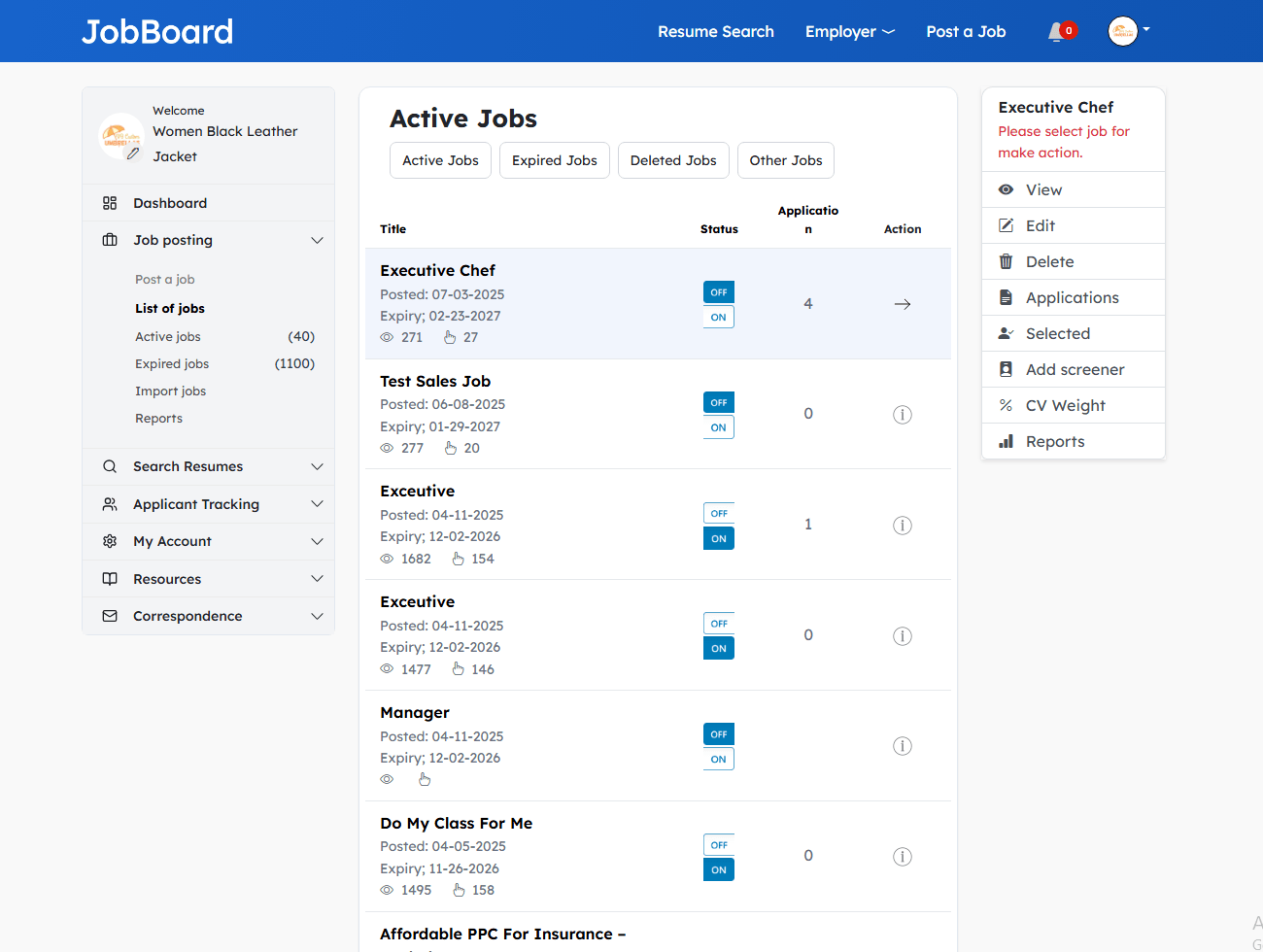
    • Post, edit, delete, and import multiple jobs
    • Activate/deactivate; view active, expired & deleted jobs
    • Preview a posting before it goes live
    • SEO-friendly job URLs so search engines can index them
    • Click-through & application stats, plus expiry renewal emails
    • Redirect job applications to a specific URL

    Job management screen for posting and importing jobs

    Screen

    Applicant screening questions

    • Create custom questions attached to a job posting
    • Applicants answer them when they apply
    • Add, edit, or delete questions any time
    • Filter out poor fits before you read a single resume

    Applicant screening questions on a job posting

    Hire

    Applicant tracking

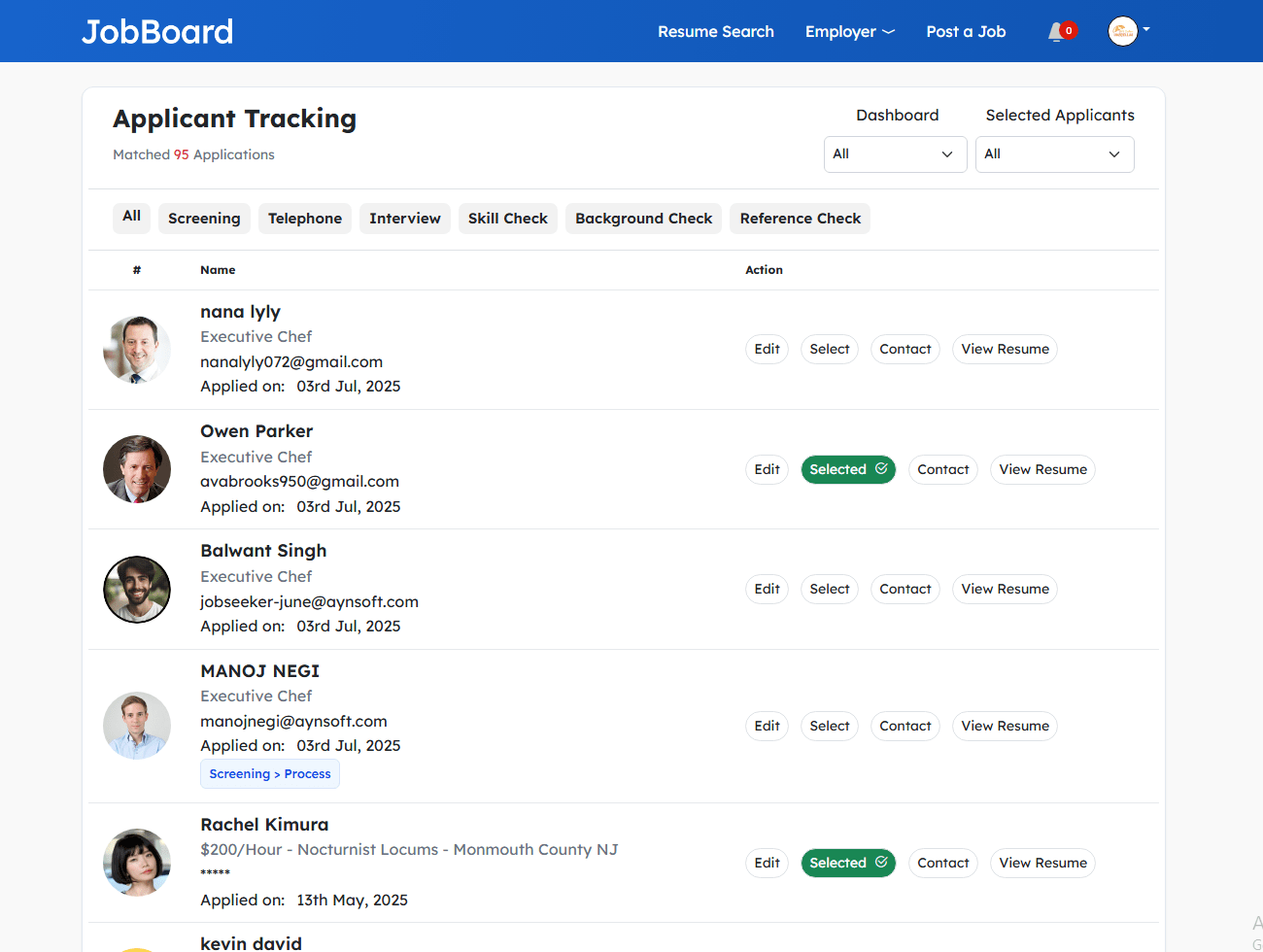
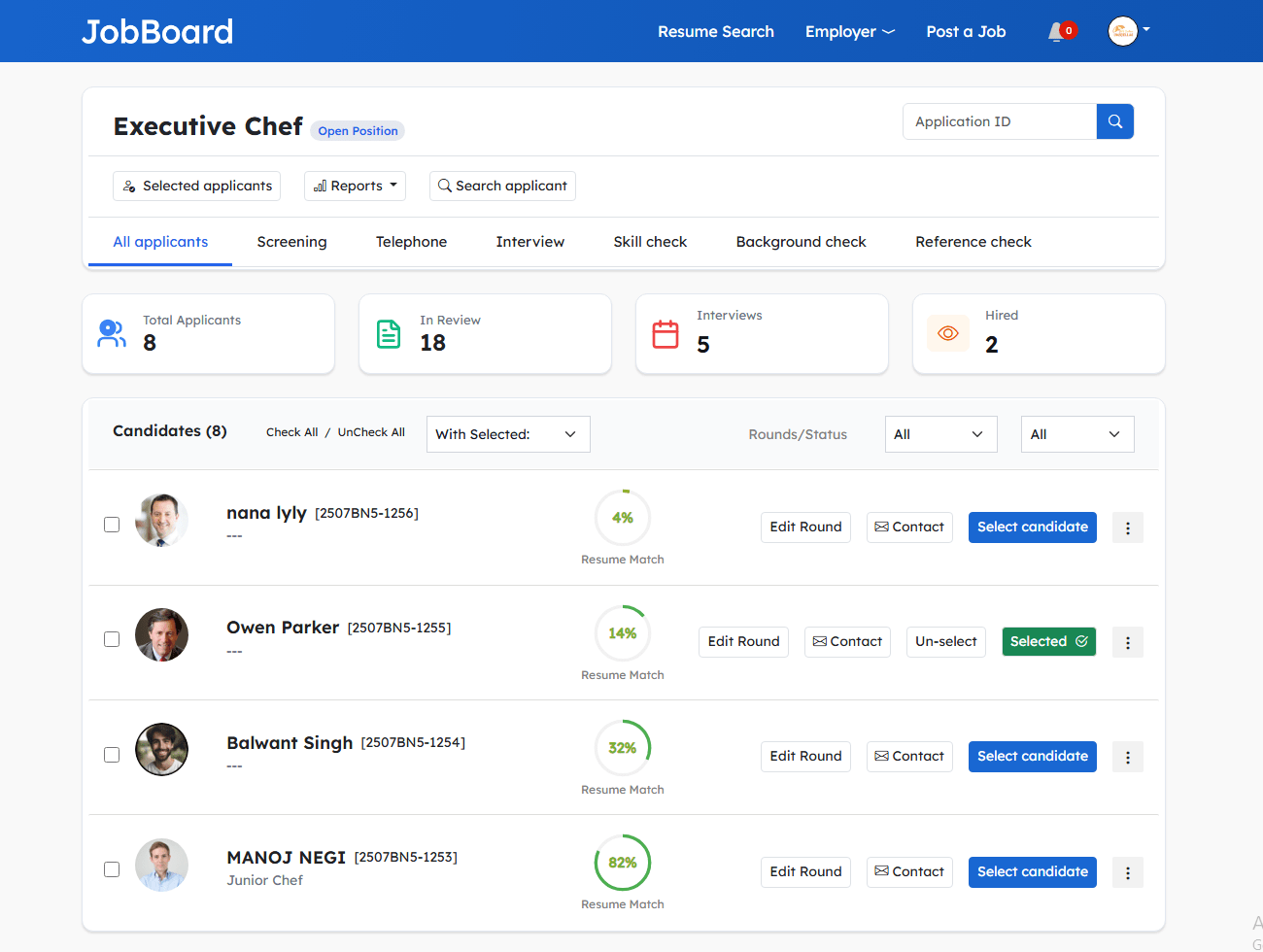
    • View applicants; track, qualify, and rate candidates
    • View hiring status across the pipeline
    • Edit the applicant round and current status
    • Send interview requests and select candidates

    Applicant tracking with ratings, rounds, and hiring status

    Manage

    Recruiter dashboard

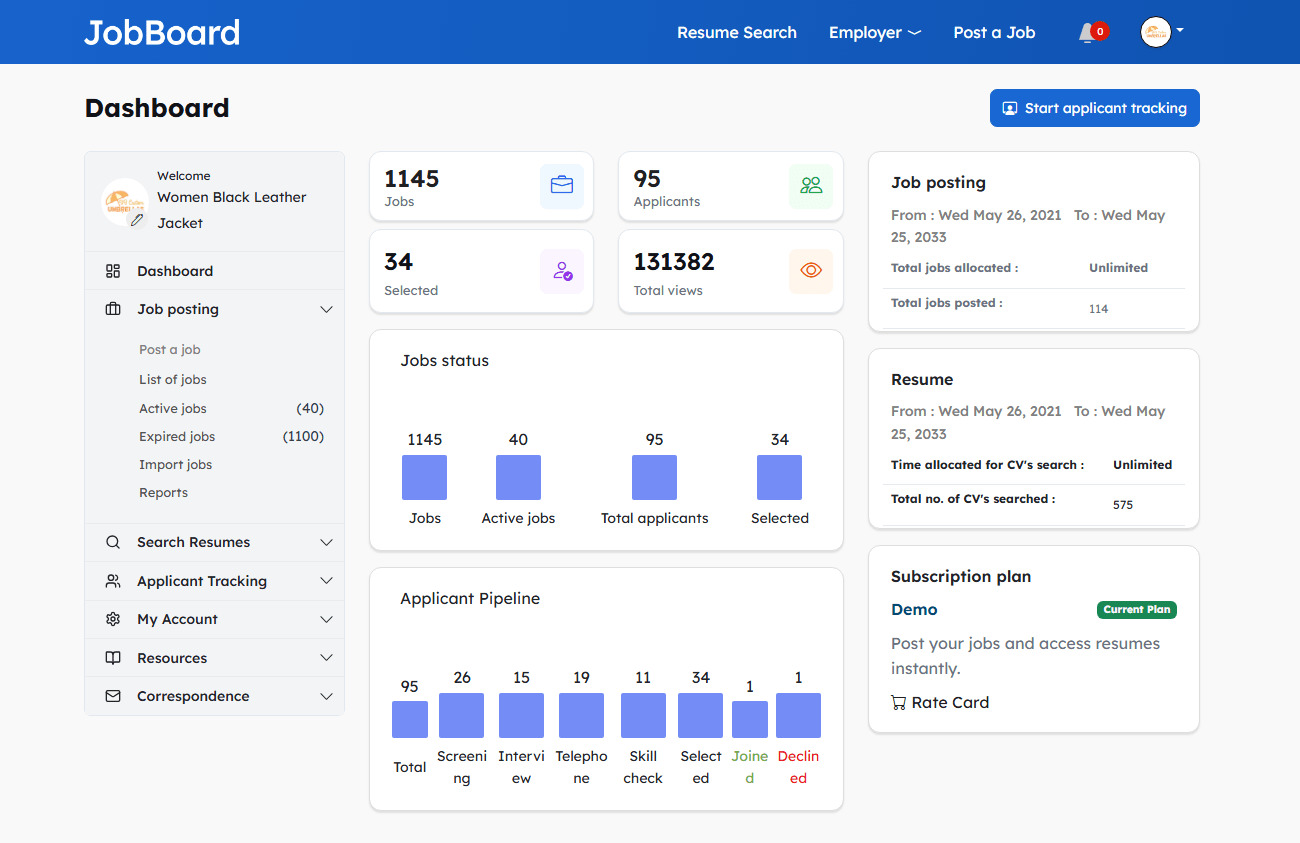
    • Graphical display of job status and applicant pipeline
    • Resume Manager inbox — save and delete resumes
    • Contact list/database of people & companies
    • View responses from admin and your rate card

    Recruiter dashboard with graphical job and applicant pipeline

    Team

    Profile & sub-accounts

    • Quick employer registration; buy postings or resume access
    • Company profile and logo, with an auto-built company page
    • Set up multiple accounts for colleagues
    • Create and manage sub-accounts under one employer

    Manage users and create colleague sub-accounts

    Everything else

    More employer features at a glance

    The rest of the recruiter toolkit, summarised.

    Employer features — eJobsite job board software
    Feature What it does
    Resume management Save, email, download, and print resumes; rate them and add private notes.
    Resume search agents Saved searches that email matching resumes daily; add, edit, activate, or delete.
    Private messaging Send a private message directly to a job seeker.
    Employer reports Job status, applicant pipeline, totals for jobs posted, active, expired, and selected.
    Job statistics Order history, activity report, click-throughs, and application counts per job.
    Auto-response email Automatic reply to applicants and expiry/renewal reminders.
    Company page A company profile page with its jobs created automatically.
    Newsletter Opt in or out of the mailing list at any time.

    Answers

    Frequently asked questions

    How can employers search for candidates?
    Search the resume database by category, rating, name, email, experience, and keywords, plus by location (country, city, ZIP), and filter the results. You can also search applicants who applied by first name, last name, and email.
    Can employers post and import jobs?
    Yes. Post, edit, delete, and import multiple jobs, activate or deactivate them, preview a posting before it goes live, and get an SEO-friendly URL for each job. You can also redirect applications to a specific URL.
    Does the software include applicant screening?
    Yes. Create custom screening questions attached to a job posting for applicants to answer when they apply, and add, edit, or delete them any time.
    How do employers track applicants?
    View applicants, track, qualify, and rate candidates, view hiring status, edit the applicant round and current status, send interview requests, and select candidates — all from the employer panel.
    Can multiple team members use one employer account?
    Yes. Set up multiple accounts for colleagues within the company by creating and managing sub-accounts under the main employer account.
    What reports do employers get?
    Reports show job status and the applicant pipeline, total jobs posted, active and expired jobs, and total and selected applicants, with a graphical recruiter dashboard.
    Are job postings SEO-friendly?
    Yes. Each job gets a search-engine-friendly URL so it can be indexed by Google, and you can view click-throughs and the number of applications a job has received.
    Are these employer features included in the price?
    Yes. Employer features are part of eJobsite job board software — a one-time payment from $600 with no monthly fees.

    See the employer tools in the live demo

    Post a job, search resumes, screen applicants, and track candidates hands-on — or talk to us about launching your own job board.

    One-time payment from $600 · All features included · info@ejobsitesoftware.com · +91 98103 36906