
Workflow guide · ATS
An applicant tracking system (ATS) automates the online application and resume-tracking process — making it simple to review resumes, respond to candidates, move them through selection rounds, and pick the best person for the job. This guide walks through the entire workflow inside the eJobsite ATS, screen by screen.

At its core, an ATS replaces the spreadsheet-and-inbox chaos of hiring with one organised pipeline. Every applicant gets an auto-generated Applicant ID the moment they apply, then moves through clearly defined rounds and statuses until they’re hired or passed over — with the whole history kept in one place.
The magic of an ATS isn’t any single feature. It’s that nothing — and no one — falls through the cracks.
What this guide covers
Capabilities
What employers can do with the ATS
Everything needed to run hiring end to end, from one control panel.
The pipeline
Six selection rounds, fully tracked
Move each candidate through as many rounds as the role needs — every step is recorded.
Screening
Telephone
Interview
Skill check
Background check
Reference check
Status at a glance
Five applicant statuses
Each candidate’s state is always clear. The system records the round, the previous status, the current status, and the date it changed.
The walkthrough
The applicant tracking workflow
From the moment a candidate applies to the moment they join — every screen in order.
Open the employer control panel
Log into the employer control panel and click Active Jobs to see your live postings and the applicants attached to each.

View applications
Click View Applications on a job to open the List of Applicants — showing applicant ID, candidate name, applied date, round/status, rating, and actions. Every job seeker is assigned an auto-generated Applicant ID when they apply.

Review the resume
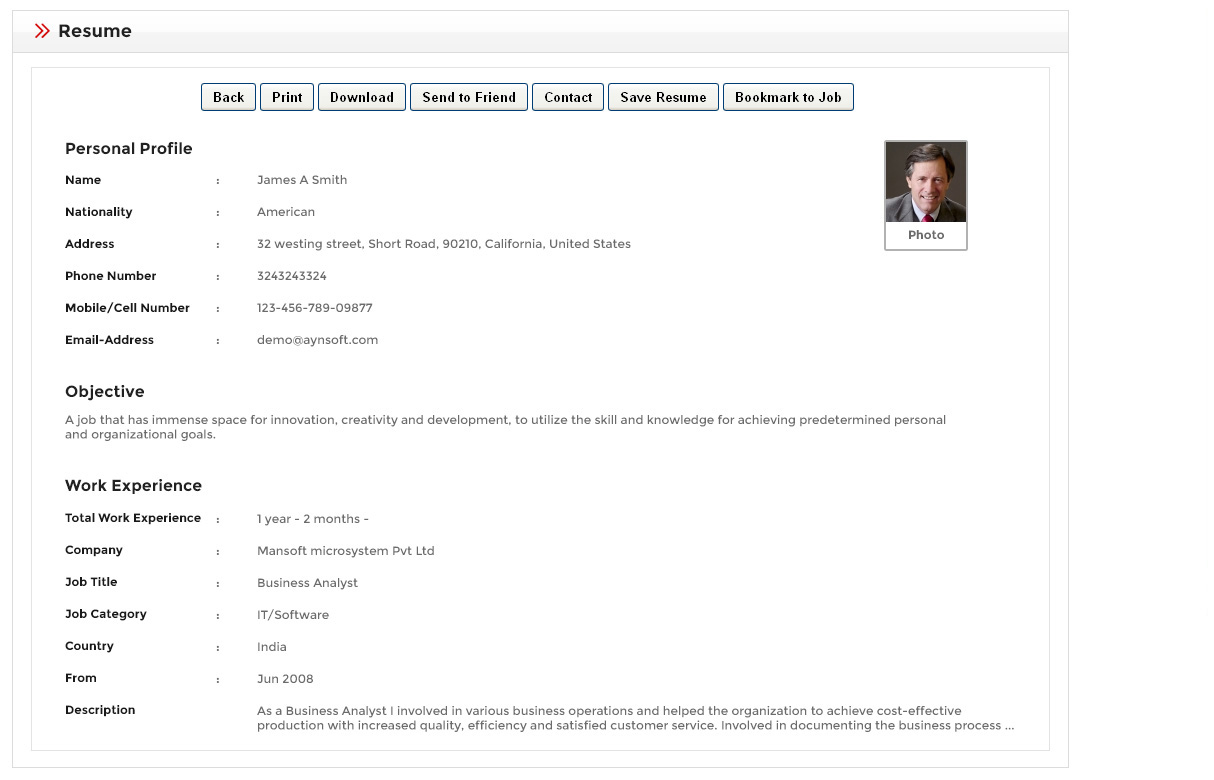
Open View Resume to see the full candidate profile, then add private comments (visible only to the employer) and rate the applicant to inform the next round.
Move through selection rounds
Edit the selection round based on your interaction with the candidate, then click Change Status and update — New, Process, Completed (Waiting), Completed (Rejected), or Completed (Select).

Track selection history & contact candidates
View the full Selection History of every interaction, and use the contact form to reach a candidate for clarification or feedback at any stage.

Select the candidate & send an offer
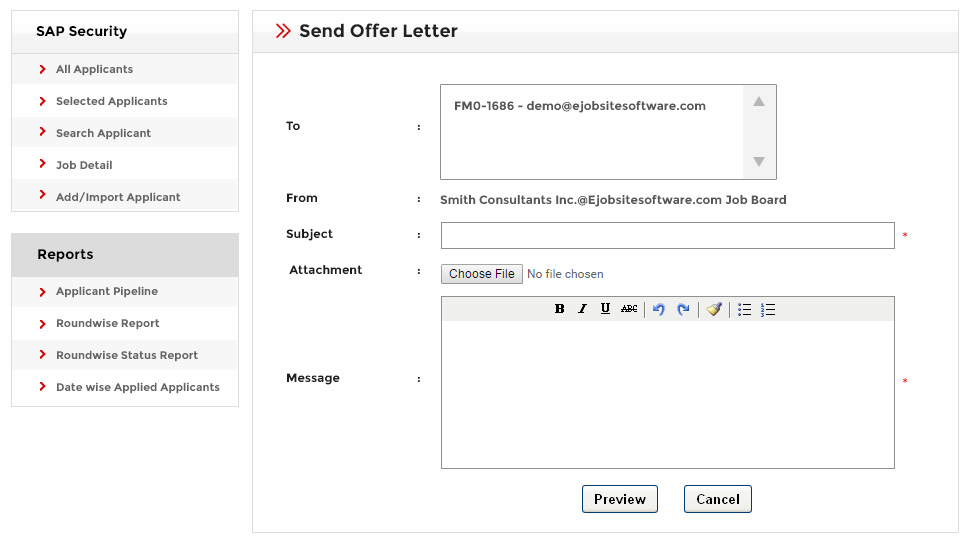
When someone’s right, mark them Selected. View the list of selected applicants, send an offer letter, and export an Excel report — then update whether each candidate has joined or declined.
Built-in prioritisation
Resume Match Detail
Inside tracking, the ATS checks each applicant against the job and ranks them — so you know who to look at first.
Resume Match Detail measures applicant-versus-job compatibility, ranking each candidate using job criteria such as location, industry, experience, and job type. It turns a stack of applications into an ordered shortlist.

See the whole funnel
Reports & dashboards
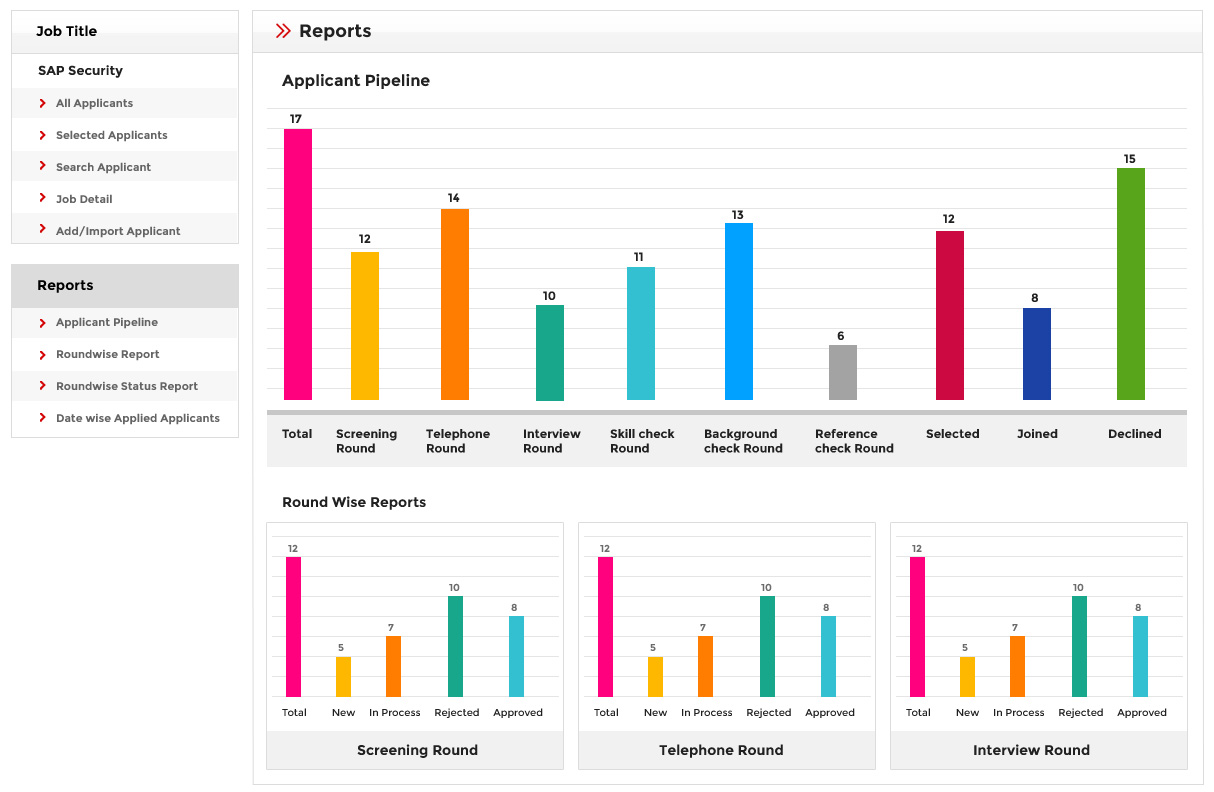
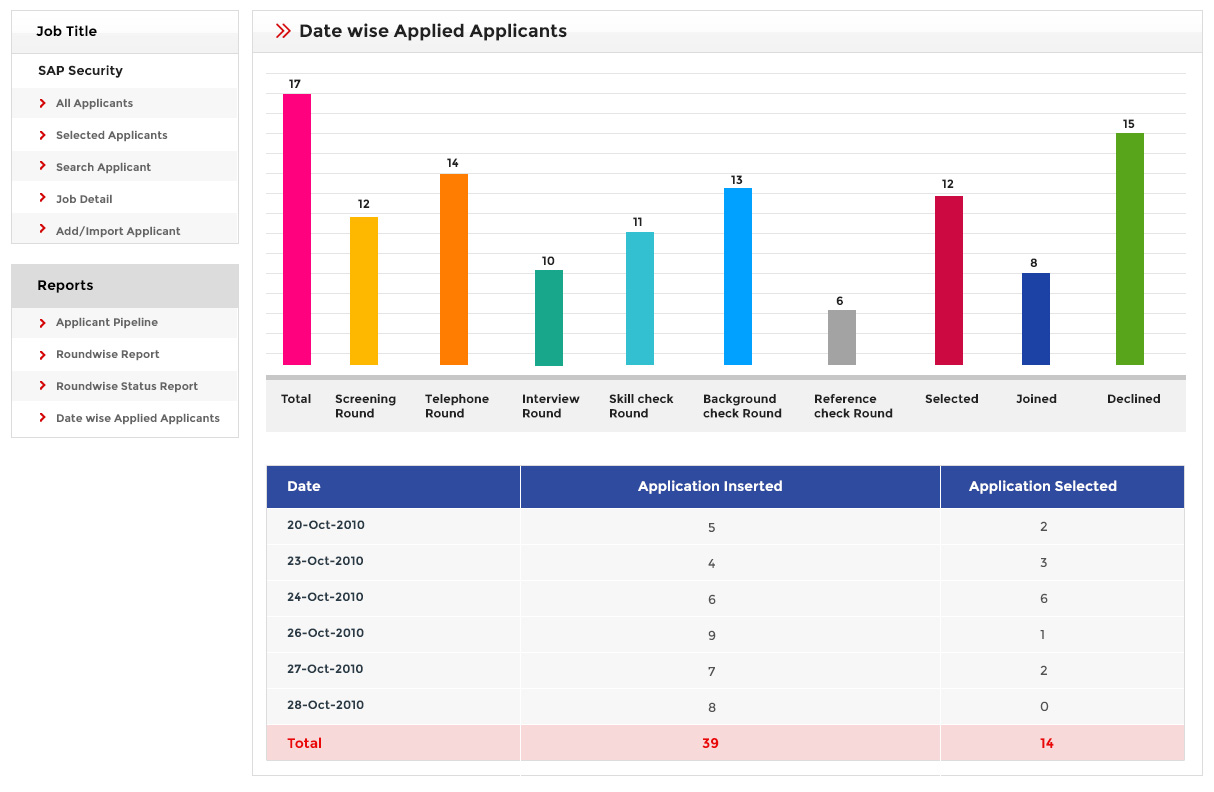
The ATS turns all that activity into reports that give employers a live dashboard of applicant status.
| Report | What it shows |
|---|---|
| Applicant pipeline | A dashboard of every applicant’s stage across the whole hiring funnel. |
| Round-wise reports | Counts and status per round: screening, telephone, interview, skill, background, reference. |
| Applicant round/status | New, In Process, Rejected, and Approved status per applicant. |
| Date-wise applied applicants | Applications grouped by the date they were received. |
| Outcome reports | Selected, Joined, and Declined candidates. |
Answers
Frequently asked questions
What is an applicant tracking system (ATS)?
What can an employer do with the ATS?
What selection rounds does the ATS support?
What applicant statuses are available?
How does the ATS show resume match?
Can I send offer letters from the ATS?
What reports does the ATS generate?
Is the ATS included with the job board software?
Keep exploring
Resources & related pages
See the ATS workflow in action
Walk through the employer control panel, selection rounds, resume match, and reports in the live demo — or talk to us about putting the ATS to work for your hiring.